Richard J Green

The Day the Logitech Harmony One Works

We’ve been lucky enough to have a Logitech Harmony One touchscreen multifunction remote control for little over a year now and it’s safe to say that it is probably the best amount money you could spend on your TV and front room electronic devices purely for it’s power and potential and the Logitech software albeit a little cumbersome and slow has enough options and features to keep anyone satisfied – Anyone but me.

At home, we have a Samsung LE40R88BD which is about two years old now. Ever since I configured the Harmony for our TV there has been a problem – It doesn’t switch between inputs properly.

In its efforts to be intelligent, the TV skips over some inputs when they are determined to be off but this isn’t so for the entire suite of inputs, so HDMI for example is skipped, while the SCART inputs or the Component is not skipped over meaning that the Harmony has always had problems getting you to the right channel for the correct viewing device.

When at Nicky’s dads house recently and adjusting his Harmony setup for him, I noticed his remote Harmony configuration for his newer Samsung LE40A686M1F gave him access to direct input buttons such as HDMI 1, 2 and so forth which made me very jealous because his remote worked exactly how it is supposed to.

About three months ago, I sat on the remote after one of the children hid it under our beanbag and needless to say, the screen took the brunt of my weight. The touchscreen still works, but you cannot see about two thirds of the display meaning I am the only person in the house able to use these buttons purely through memory of their position.

I got an Xbox 360 for Christmas, which, with built-in infra-red and Media Center Extender support meant I would need to add this to the Harmony, however this gives me a problem. If we can’t see the screen how are we going to see the new buttons and this could cause a problem for channel switching also.

I decided to perform an experiment. I added the model code for Nicky’s dads TV set to our remote as a second TV and didn’t make it part of any of our activities configured on the remote, and I memorised the position of the HDMI input buttons. When I took to our TV with these buttons, to my surprise the commands were received by the TV and they worked.

I’ve now since removed our original TV from the Harmony configuration and replaced it in all of the activities with Mick’s model TV meaning that the Harmony now takes us directly to the correct input for each activity and also allows me to control the Xbox 360.

The lesson to be learnt: Although the Harmony software gives you excellent control over your devices, don’t always assume it’s right, and experiment from time to time.

I’m Not as Green as My Name Suggests

With my name being Richard Green, one could go some way to try and associate me with environmental tree-friendliness. Contrary to that, I am actually extremely energy inefficient. My biggest energy crux in my current Windows Home Server machine.

Running on a Dell PowerEdge SC1425 with two Intel 2.8GHz Dual Core Xeon processors and 6GB of DDR2, this thing is total overkill for Windows Home Server and isn’t actually very good at it’s job either. Granted, it’s got dual Gigabit Ethernet for teamed and reliable network connectivity and it’s got SATA-II drives for high speed data movement, but at the same time, its in a 1U chassis which means it only supports a maximum of two drives, and it’s got a 450W power supply which when faced with the two Intel Xeon processors, both of which are designed at 90W power consumption makes for an eye-watering electricity consumption report.

I did try to enhance the usage profile of the machine by using an add-in for Windows Home Server called LightsOut, however the great feature of this software, which is to sleep and wake the server at pre-defined times during the day remained useless on the PowerEdge. Being a server machine its power supply doesn’t support the S3 power state which means it doesn’t support sleep – Only Shutdown and Restart, as a result, meaning the server stays on 24×7.

Granted, I could manually shutdown the server each night and power it back up again during the day when needed, but that’s not the design of a server. It’s designed to be accessible when you need it. My view on energy efficiently and environmental impact kind of fits this mantra also. I’m quite happy to spend a little money on energy efficient products if it will benefit me, and if my way of life isn’t impacted as a result. This example of powering down the sever manually has an impact because it’s an additional action upon me to complete, it means the server is potentially unavailable during start-up periods when I want it and generally makes the appliance less useful.

I’ve been looking around at what other people have done with Windows Home Server machines and seen a growing trend in Atom powered machines with low power consumption, designed for always on availability. My issue herein is that I have a 19” server rack in which all of my kit is mounted so the device needs to comply to the form factor to make it suitable, which basically rules out all of the pre-built systems from people like HP and Asus, so I’m being hurtled back into the world I escaped a few years ago – Self build.

The criteria for the project are quite tight:

  1. 19” Rack Mount Chassis – 1U, 2U, 3U or 4U is not really important.
  2. Support for at Least 4 SATA-II drives.
  3. Ideally support for a regular ATX PSU to reduce cost and improve efficiency over a server PSU.
  4. As near to silent operation as possible.
  5. Low power consumption.

After trawling the internet for quite some time on the subject now, I believe I have produced the ultimate solution using the following:

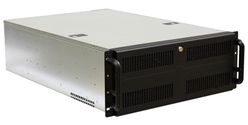
  • X-Case RM400/10 4U Rack Mountable Case
  • ASUS AT3IONT-I Intel Atom 330 and nVidia ION Montherboard
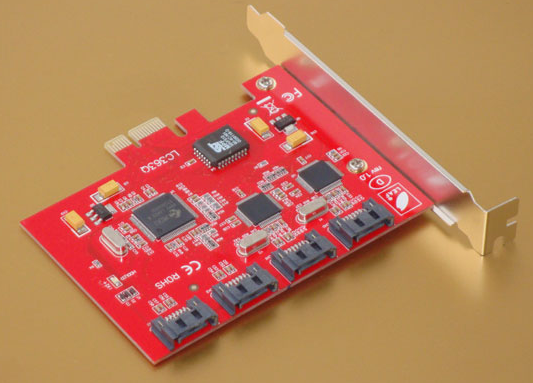
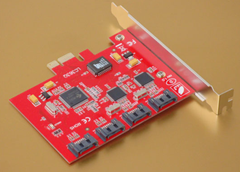
  • StarTech 4-Port PCI Express SATA-II Controller
  • Corsair Value Select Memory
  • Corsair CX400W Power Supply
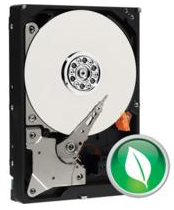
  • Western Digital 1TB SATA-II Green Hard Disks

image

The case from X-Case at http://www.xcase.co.uk/product-p/case-x-case-400-fslash-10.htm?CartID=1 is the building block for this system. It allows me the flexibility to use my existing rack at home, while in a 4U chassis is gives enough room for 10x 3.5” hard disks and 1x 5.25” optical drive, although my machine will not have one installed as Windows Home Server can be installed via USB.

image

The ASUS, Intel Atom, nVidia ION Motherboard trick box from Novatech http://www.novatech.co.uk/novatech/prods/components/motherboards/miniitxmotherboards/90-MIBCT0-G0EAY0GZ.html gives me a Dual Core 1.6GHz processor which under full load only draws 8W of power and yet does not require active cooling, and only uses a passive heat sink, all the while, the miniITX form factor of the motherboard keeps the remaining power draw to a minimum.
image

The motherboard hosts 4 SATA-II ports, so needing to increase that to come close to the 10 drive support of the case, I will add a StarTech 4-Port PCI Express SATA-II Controller. The StarTech card was chosen because it appears to be the only card to combine SATA-II and PCI Express interface, as many of the other cards such as those powered by the Silicon Image 3114 controller are PCI based. The StarTech card can be seen here http://www.leaf-computer.de/raid-controller-4-port-sata-ii-pcie-x1.html and can be purposed from Leaf Computers via Amazon Marketplace.
image

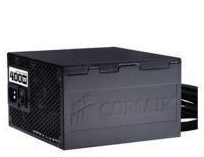
The Corsair CX400W power supply from Overclockers UK at http://www.novatech.co.uk/novatech/prods/components/powersupplies/corsair/cmpsu-400cxuk.html is of good efficiency and also being near silent with a slow rotating 120mm fan to keep the air moving. This supply also has six SATA connectors for the hard drive power needs and four Molex connectors which can easily be converted to SATA once the need arises.
image

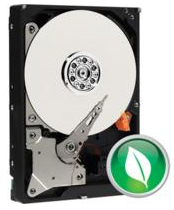
The Western Digital hard disks are of the Green variety. The demands of a Windows Home Server are not high speed disk access, unlike a RAID10 SQL Server. The needs are for high volumes of always available storage. The Green drives give SATA-II high speed access while providing a low thermal output because of the adaptive rotation speed controls and also the low power consumption.

Although only speculation based on figures collected from sources around the Internet, I believe that the Windows Home Server of this specification would consume a mere 32 Watts at idle and 38 Watts and full load when using 2 1TB Green drives. The drives consume about 6 Watts each, so simply add this amount for each drive added. The other advantage, is by using a standard ATX power supply with 12V 4-Pin connector to power the motherboard, I will have support for S3 power state, allowing the server to be put into Sleep overnight. This will allow me to reduce the operational hours from 24×7 to 17×7 in my example.

Using an online power calculator, we can see that the server of this specification will consume only 16 kWh (Kilo Watt Hours) per month. I have an in-line power meter currently connected to my personal computer which I will be attaching to the Home Server in the next day or so, and then I will be able to see the real-world draw of the current PowerEdge SC1425 to compare the two and see the potential savings.

I will create a new post to show the comparison once the data is available.

The First Two Days of Dog

Enjoying a good challenge is what life is all about. As if looking after our three children isn’t enough of a challenge we’ve taken up the helm as dog owners. Lucy, our Working Cocker Spaniel has been with us now for two whole days (two and a half if we include the sleeping she did with us on Saturday afternoon and the poo on the kitchen floor this morning).

So far, she seems to be settling in really well: She’s getting the hang of her name and responding (sometimes) to it when called. She is starting to understand the command no to some degree and we’ve also been teaching her wait as command because sometimes we don’t want her to sit down but we want her still like to remove her lead for example.

Wait is working somewhat, although trying to tell a twelve week old puppy to stand still is a problem in itself, so I’m sure this one will work better over time. We haven’t started with sit yet (or at least I haven’t) because we want to concentrate on the name and toilet training first – Get those right and we’ll move on to something else.

At the moment, we seem to be having more success with using the rug in the lounge or the floor in the kitchen than the garden as intended, but we’ve got to give it time – Something which I unfortunately am short of, being an impatient kind of person. She is on the other hand doing really well with night times and sleeping. Settling down in her bed when we go to bed at about midnight, she is sleeping through until about 7 AM and is managing to hold herself for the toilet until then. The only problem is that upon waking, she is so excited to see me or whoever else greets her, that some of the stored wee usually comes out – Doh. Bladder control comes with age I guess.

I took her on her first public outing last night to Pets at Home to pick up a Pee Post. I was actually after the pheromone spray but they don’t stock it. She was a little angel in the car and hopefully she stays like it as we end up carting around the south of England visiting people quite often. She got out of the car with ease, however after that decided she’d rather be carried around the store. The smell of hundreds of other dogs was obviously a bit too much for her to take in, as she was shaking a bit to start with, but she came around to it after a few minutes.

It’s early days still, but I love her loads already. She is super cute and she seems so loving and affectionate to me, Nicky and the girls after just these two and a bit days – I’m looking forward to once we get some solid training into her, and we can enjoy her as a young puppy dog and the rest of her life, go out and do things and see places together.

Keep your eyes on my Flickr feed for pictures of her.

Comparing the Cost of Windows Phones in the UK

In an angry come jealous state, my wife Nicky today upgraded her O2 contract and got herself a HTC HD7. My contract is due for upgrade at the end of October, so I have another week and a bit to wait before I had upgrade.

In my current agreement with O2, I have a very tidy deal going on thanks to my employment from Xerox which grants me 30% discount on the monthly line rental, however my sources on the O2 Customer Forums tell me that this deal doesn’t exist any longer, so I’ve set out to compare my current plan with some plans on O2, Vodafone and Orange which are of interest – Interest being defined in this case by price and value for money, which is in turn determined by the inclusive allowance of each contract.

As you will see from the above PowerPoint WebApp slide, my current package weighs in at an 18 month overall cost of £585, while if I upgrade to what O2 will recommend me in it’s place, the Smartphone 45, I will be spending a whopping £810 instead, meanwhile Vodafone come out on-top with the Vodafone tariff at £35 per month weighing in at a somewhat mild £630 over 18 months.

Sure, I could save £5 per month on all of these networks by switching to 24 months, but having to wait 18 months for the next iteration of phone is dire enough.

If Tesco Mobile started to sell Windows Phone 7 devices, I would probably jump over there to get a 12 month contract – Something of a rarity these days.

The Road to Half–One Week to Go

Back in July I posted here in a post entitled The Road to Half discussing my progress towards the Run to the Beat Half Marathon. Well time has flown by and before I’ve known it, the race is next weekend.

Since July, my longest run is no longer 15.5km but just shy of 22km, where 21km is the distance for the half marathon, and I’ve run a total of 451km since getting my Nike+ Sportsband at Christmas and after Run to the Beat and a 10km or two, I will breach 500km which I think for someone who couldn’t run to the shops and back a year ago is a big achievement.

Covering the final part of the distance, 15km onwards was actually relatively harmless, except perhaps to my knees. Having finished the build of my mountain bike, lovingly named Mr Pink I’ve been getting some cross-training in which I think has helped my overall speed and stamina, however after a day at Whites Level in Afan Forest with a couple of friends, I was worried that I may have overdone the cycling leaving my muscles aching for days and days afterwards. Thankfully I went out earlier this week and managed to cover the distance one last time before calming things down ahead of next week.

I was reminded of the cause I’m running for this week when all of the information and kit for the race came in the post – I’ve got my race number and my pen details for the start, and I’m going to be meeting the NSPCC teamGO team before the race for a chat and a team photo, so I’m really looking forward to meeting the other people. It would be nice to meet some people there who have actually been helped by the NSPCC.

Over the course of the next week, I’m going to be sleeping and eating well and ensuring that I’m in prime condition for the race.

I today updated my Virgin Money Giving page at http://uk.virginmoneygiving.com/richardjgreen to include my offline donations which people have so kindly pledged. This brings my donation total up to £505 so far, which is £5 over my target donation, so a massive thank you to everyone who has donated to help NSPCC, but that doesn’t mean that the work it done. Just because my target was £500 doesn’t mean I can rest and stop trying.

With one week to go before Run to the Beat, and with my donation page open for a few weeks after the  event also there is still plenty of time to help support NSPCC and all the work they do to help children around the UK and protect them from cruelty, so if you haven’t already been able to sponsor me for them in person or via Virgin Money Giving then please do spare a few pounds for them as every penny helps a child somewhere so it’s a totally worthy cause.

Older Posts