VirtualBox looks to be the first on the top of the virtualization pile with this one:
http://lifehacker.com/5295334/virtualbox-30-beta-adds-gaming+level-graphics
VirtualBox 3.0 Beta 1 has added Direct3D and OpenGL 2.0 support to their virtualization product, which means that those Windows Vista and Windows 7 virtual machines will finally be able to enjoy the Windows Aero UI that they so deserve.
For me, I think this could be a real driver for VDI (Virtual Desktop Infrastructure) as I think that main hold-back up until now has been the visual appearance of VDI (or rather the lack of).
I was rather hoping Microsoft could have managed Direct3D in Server 2008 R2 Hyper-V or Hyper-V Server R2 but obviously not as they use a graphics card much in common with VMware’s offering.
Hopefully this advance from VirtualBox will move them both along because we all know once one jumps the other will follow.
by richardjgreen on
June 30, 2009
tagged in Hyper-V, VirtualBox, Virtualization, VMware
This is something that has bothered me a lot recently as I have been using Photoshop for Wedding photo’s and this and that, and this tool would I’m sure save countless designers some time, especially if your not hot on file naming conventions.
http://lifehacker.com/5302051/thumbview-adds-thumbnail-support-for-unsupported-images
The idea is to allow Windows to thumbnail up to 19 additional image formats including PNG, PSD and TIFF to name a few.
I haven’t personally tried it yet, but the nice people at Lifehacker claim it was fast and didn’t cause a performance hit which is what we like to hear.
by richardjgreen on
June 30, 2009
tagged in Photoshop, Windows, Windows Explorer
Facebook is a great place and you can find out and see peoples lives with never before levels of depth, however if you are a bit of a friend fiend because you just can’t bear to click that reject button you might end up with a lot of friends who you just actually don’t care about.
An idea from this guy (Adam Pash) is rather good:
http://lifehacker.com/5302107/tweak-facebook-to-display-only-updates-you-care-about
Create a display view in Facebook that only shows updates and things from the friends of yours that you actually care about, and as a result, you don’t need to disappoint or annoy anyone with a friend removal.
Enjoy
by richardjgreen on
June 30, 2009
tagged in Facebook
So I’m not really a huge Michael Jackson fan. Sure I like Billy Jean, Thriller and the like but not too much beyond that, but that doesn’t remove from the fact that a lot of people are huge fans.
Therefore, some nice chap came up with these themes for Windows 7.
You can download them from http://www.redmondpie.com/michael-jackson-wallpaper-and-theme-for-windows-7/
by richardjgreen on
June 30, 2009
tagged in Theme, Windows 7
As most people will know from various sources, I’m Out of the Office from work at the moment on paternity leave with our new baby Layla.
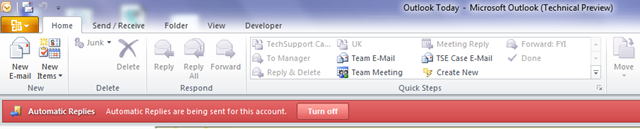
As an obvious result, I’ve got Automatic Replies enabled in Outlook to warn people I am Out of Office. I have Outlook open all of the time as I check my POP3 email accounts in it, but today I saw a menu appear in Outlook to warn about the Out of Office for the first time.
This is a great step on from previous implementations of the Out of Office namely because (having fallen victim myself once or twice) it’s fairly easy to leave it on when you get back into the office and forget about it.
by richardjgreen on
June 29, 2009
tagged in Office 2010, Outlook, Outlook 2010
I’ve been a OneNote user for some time and namely with OneNote 2007 and it’s lack of Ribbon UI.
When I originally got my old O2 XDA Orbit (HTC Artemis) it came with OneNote Mobile as part of the office applications, however I was not a user at this point in time.
As time moved on and I began to use OneNote, I had upgraded the ROM on my phone which meant I no longer had OneNote.
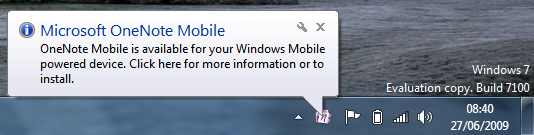
I was left in the same situation with my Touch HD as the Windows Mobile 6.5 ROM I am using doesn’t include OneNote, however when I attached my phone via USB today so that I could flash the Radio and the ROM with fewer builds, I noticed a popup from Office 2010 which 2007 never showed.
(I have attached the phone via USB before, but it’s always been with Office 2007 installed not 2010 like now)
Continue Reading
by richardjgreen on
June 29, 2009
tagged in Office 2010, OneNote, Touch HD, Windows Mobile
Just as Apple take down their store for new products to the extent that it has become known that if the Apple store it down, a new product is coming, is something going down with Zune?
Microsoft use the terms scheduled outage, but I wouldn’t say that exactly – I’ve been a Zune user for well over a year now and I’ve never seen this email before.
If it is just site changes then hopefully it will be with a bit more Silverlight. Damn I love Silverlight
by richardjgreen on
June 17, 2009
tagged in Zune
Just to let anyone using a Baby-Green email account that outbound email is now working so you can go about your lives as normal.
It seems that any mails sent during the weekend long outage period are lost and weren’t re-delivered so you will need to trawl your sent items to redeliver the messages.
Richard
by richardjgreen on
June 17, 2009
tagged in Baby-Green, Email
This post is just a quick FYI that there are problems with outbound email for users with @baby-green.co.uk email addresses.
I can receive emails just fine, however any replies will not be delivered.
The problem is being investigated by our hosting provider and will hopefully be resolved ASAP.
Apologies to all.
Rich
by richardjgreen on
June 14, 2009
tagged in Baby-Green, Email
Strikethrough is something which I never used to use until I started using OneNote some time ago.
Strikethrough in OneNote is good because it means you can make lists and cross things out as you go. The trouble in OneNote 2007 was that settings and options for Font appeared in a menu on the right which wasn’t static – It would come and go as you did other things in OneNote.
Now in OneNote 2010 however, with the new Ribbon interface, Strikethrough has rightfully earnt a button on the toolbar.
by richardjgreen on
June 13, 2009
tagged in Office 2010, OneNote, Ribbon